GUI (How It Works)
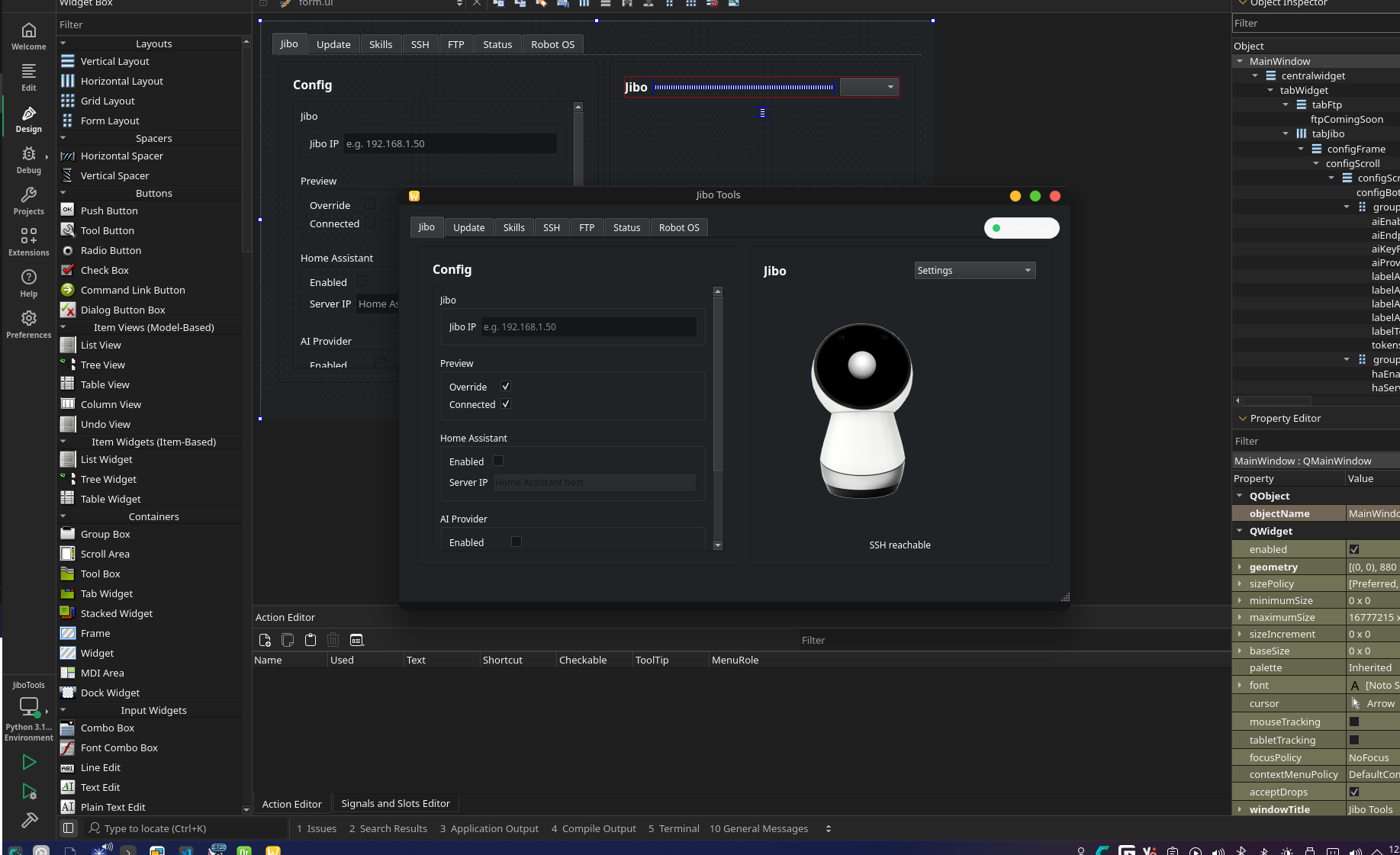
The GUI is an optional Qt (PySide6) front-end.
Important
the GUI does not re-implement the mod/updater logic; it mostly launches the same Python scripts and shows their logs.
Entry points
- Linux launcher:
../jibo_gui.sh - Windows launcher:
../jibo_gui.bat
The GUI module it runs is:
python -m gui.main_panel
The implementation is in:
../JiboTools/JiboTools/gui/main_panel.py
Main Panel overview
The main panel UI (form.ui) is loaded at runtime (Qt Widgets, not QML):
../JiboTools/JiboTools/form.ui
MainWindowController wires up widgets and behavior:
- “Connect” button opens an SSH session to the robot using Paramiko.
- It reads
/var/jibo/identity.jsonto display the robot name. - The panel includes toggles/fields for Home Assistant and AI settings (currently UI-only wiring; the panel mainly focuses on connection + launching tools).
Connection behavior
- Host/IP comes from the UI field.
- Credentials are currently fixed to
root/jiboin the panel code. - UI shows a status dot and swaps images based on connection state.
Tool runner windows (Installer / Updater)
When you click installer/updater from the panel, it spawns a separate “Tool Runner” window:
- Installer: runs
jibo_automod.py - Updater: runs
jibo_updater.py
The common implementation is:
../JiboTools/JiboTools/gui/tool_runner_window.py
How the tool runner executes scripts
- Uses
QProcess(seeProcessRunner) to run a Python process. - Captures merged stdout/stderr and appends it into a log view.
- Has a Start/Stop button (Stop terminates then kills if needed).
It resolves which Python to use with:
resolve_python_invocation()in../JiboTools/JiboTools/gui/process_runner.py
Resolution order (simplified):
- Use repo-local
../.venv/Python if present. - Otherwise use the current interpreter (useful if launched from Qt Creator).
- Windows fallback:
py -3. - Linux fallback:
python3, thenpython.
Passing arguments
- The tool runner has an “Extra args” textbox.
- For the updater runner specifically, it also has a host field that becomes
--ip <host>.
This means the GUI is effectively a thin wrapper over the CLI flags described in 03 - CLI Arguments.
“Open in terminal”
The tool runner can try to spawn an external terminal window with the exact command line it would run.
- Linux: tries
x-terminal-emulator,gnome-terminal,konsole, etc. - Windows: uses
cmd.exe.
Dependencies
GUI deps live in:
../requirements-gui.txt(PySide6)../JiboTools/JiboTools/requirements.txt(PySide6 + Paramiko)
The CLI installer launcher ../jibo_automod.sh also auto-creates ../.venv/ and installs ../JiboTools/JiboTools/requirements.txt if you pick GUI mode.
Practical notes / limitations
- The GUI is great for convenience, but debugging is often easier from CLI because you can see exactly what flags are being passed.
- The installer still requires RCM mode + USB access; the GUI does not remove that requirement.
- The updater requires SSH access (meaning: you must already be in developer mode / checkmark boot).